Clock in with fingerprint or face
Each employee registers their phone once and punches in with fingerprint or face. Zeprub never receives the fingerprint.
Your employees punch in and out from their phone with fingerprint or face, right at work, with a selfie if you ask for one. You see who showed up, who didn't, and the hours ready for payroll.
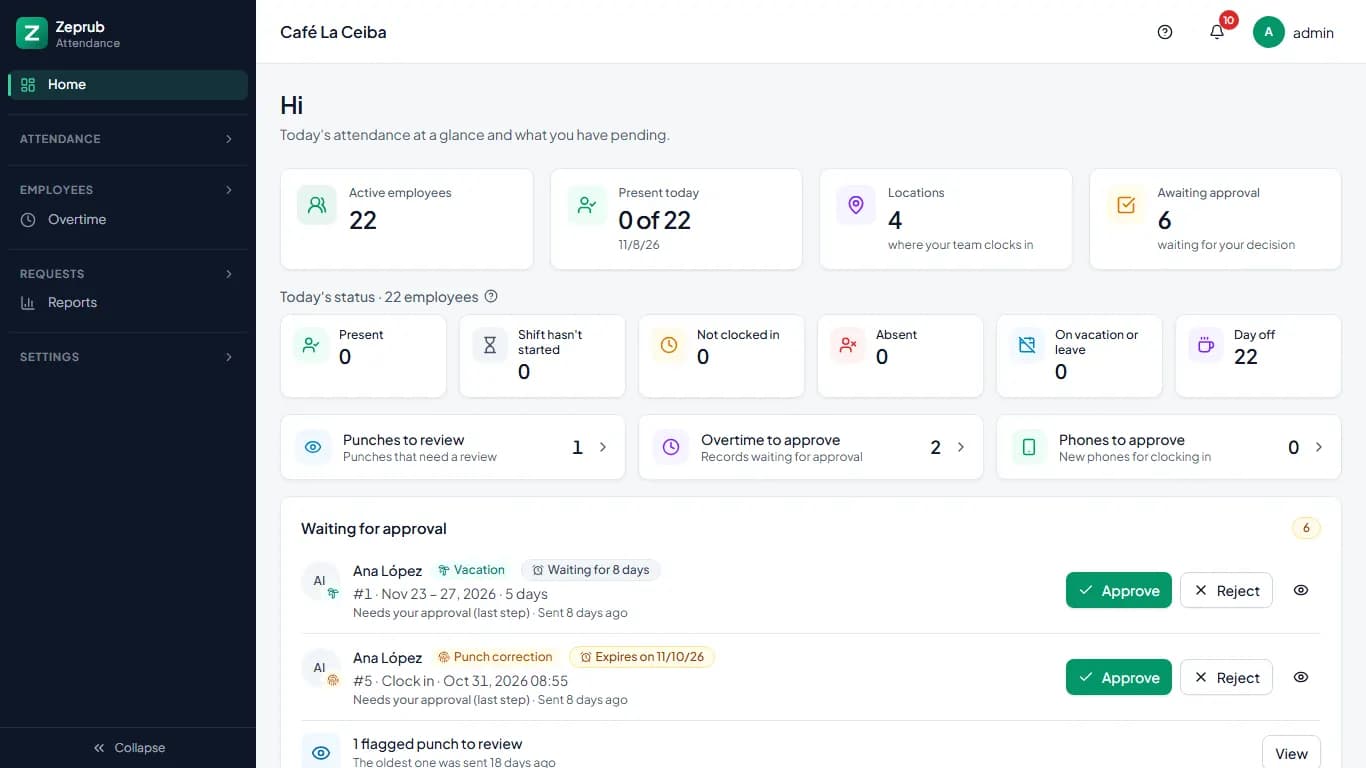
Time clocks, paper timesheets and WhatsApp messages tell you too late.
Compare Zeprub with time clocks, punch cards and spreadsheets
Features
All included, at every price.
Each employee registers their phone once and punches in with fingerprint or face. Zeprub never receives the fingerprint.
Place each location on the map and choose how far out people can clock in. If someone clocks in outside, the punch is flagged with the distance, or rejected if you prefer.
If you turn it on, every punch saves a photo taken at that moment, and your manager sees it next to the punch.
A tablet at the entrance for people who don't clock in with their phone. Each person uses their code and PIN, or their QR code.
Time off, vacation, punch fixes and overtime are requested from the phone and approved by the supervisor. Your manager can sign off last if you want.
Attendance, late arrivals, absences and overtime per employee, in Excel or CSV, with the same columns as your payroll.
Each location with its own clock-in zone, time zone and employees, in one account.
The system, the portal and notifications reach each person in their own language.
How it works
No technicians or hardware needed. Everything is set up from your browser.
All you need is your email and your business name. The 15-day free trial starts when you confirm your email.
Place your location on the map, choose the schedule and add your employees one by one, from Excel or with a link so they can join on their own.
Each employee registers their fingerprint or face once and from then on clocks in within seconds. You see it in under a minute.
Who it's for
It works the same with two employees or five hundred.
A shop, a café or a workshop with a few employees and no time for paperwork.
Several locations and one place to see all your employees.
Salespeople, technicians or crews who work where the client or the job site is.
Pricing
Nothing to choose: the price adjusts on its own to your active employees. Every feature is included.
1 to 5 employees
$4.99per month
Flat price for your whole team
With 5 employees it works out to $1.00 per person
6 to 15 employees
$9.99per month
Flat price for your whole team
With 15 employees it works out to $0.67 per person
16 to 50 employees
$0.99per employee per month
With 16 employees: $15.84 per month
51 employees or more
From$49.50per month
$0.75 per employee from 66 employees
Move the slider or type how many employees you have.
Prices in US dollars (USD), billed monthly. You're charged for the highest number of active employees in the month.
Unlike other systems, Zeprub doesn't follow your team around. It only checks location at the moment someone punches in or out, to confirm they're at their location. Nothing else.
Your team punches in with peace of mind, and you get attendance you can trust.
Your company's information is stored on Microsoft Azure servers, with backups every day.
Each company only sees its own data: no user can see or change another company's information.
People who use the system at your company can log in with a code from an authenticator app, and you can require it for everyone. The Zeprub team uses it too and only sees your account if you authorize it.
FAQ
You create your account, confirm your email and get 15 days to use all of Zeprub, with every feature and no employee limit. We'll remind you before it ends.
No. To try Zeprub you only need your email. We don't ask for a card or any payment details.
It depends on how many active employees you have, starting at $4.99 a month. Use the calculator on this page to see your exact price.
You can activate your subscription and keep using Zeprub without losing anything. If you don't, your account switches to read-only: you can log in, view and download everything, but your employees can no longer clock in. Your data is kept.
No. They clock in from their phone's or computer's browser. If they want, they can add Zeprub to their phone's home screen.
No. The fingerprint or face is checked by the phone, just like when you unlock it. Zeprub only receives confirmation that it was the right person.
The punch is saved but flagged with the distance to the location, so you decide whether to accept it.
Yes. With kiosk mode, a tablet at the entrance lets everyone clock in with their code and PIN or with their QR code. If you turn on the selfie, it takes one too.
Download the period summary in Excel or CSV with days worked, regular, night and approved overtime hours, late arrivals and absences. You can adjust the columns to your payroll system's format.
Yes. There are no lock-in contracts. You can cancel from your account and download all your data whenever you want.
Contact
Leave us your details and we'll reply by email.
You can also reach us:
Email: ben@zeprub.comAll you need is your email and your business name. Every feature is included.